
Using Scalebars#
- EOmaps has a nice customizable scalebar feature!
use
s = m.add_scalebar(lon, lat, azim)to attach a scalebar to the plotonce the scalebar is there, you can drag it around and change its properties via
s.set_position,s.set_scale_props(),s.set_label_props()ands.set_patch_props()
Note
You can also simply drag the scalebar with the mouse!
LEFT-click on it to make it interactive!
RIGHT-click anywhere on the map to make it fixed again
There are also some useful keyboard shortcuts you can use while the scalebar is interactive
use
+/-to rotate the scalebaruse
alt++/-to set the text-offsetuse the
arrow-keysto increase the frame-widthsuse
alt+arrow-keysto decrease the frame-widthsuse
deleteto remove the scalebar from the plot
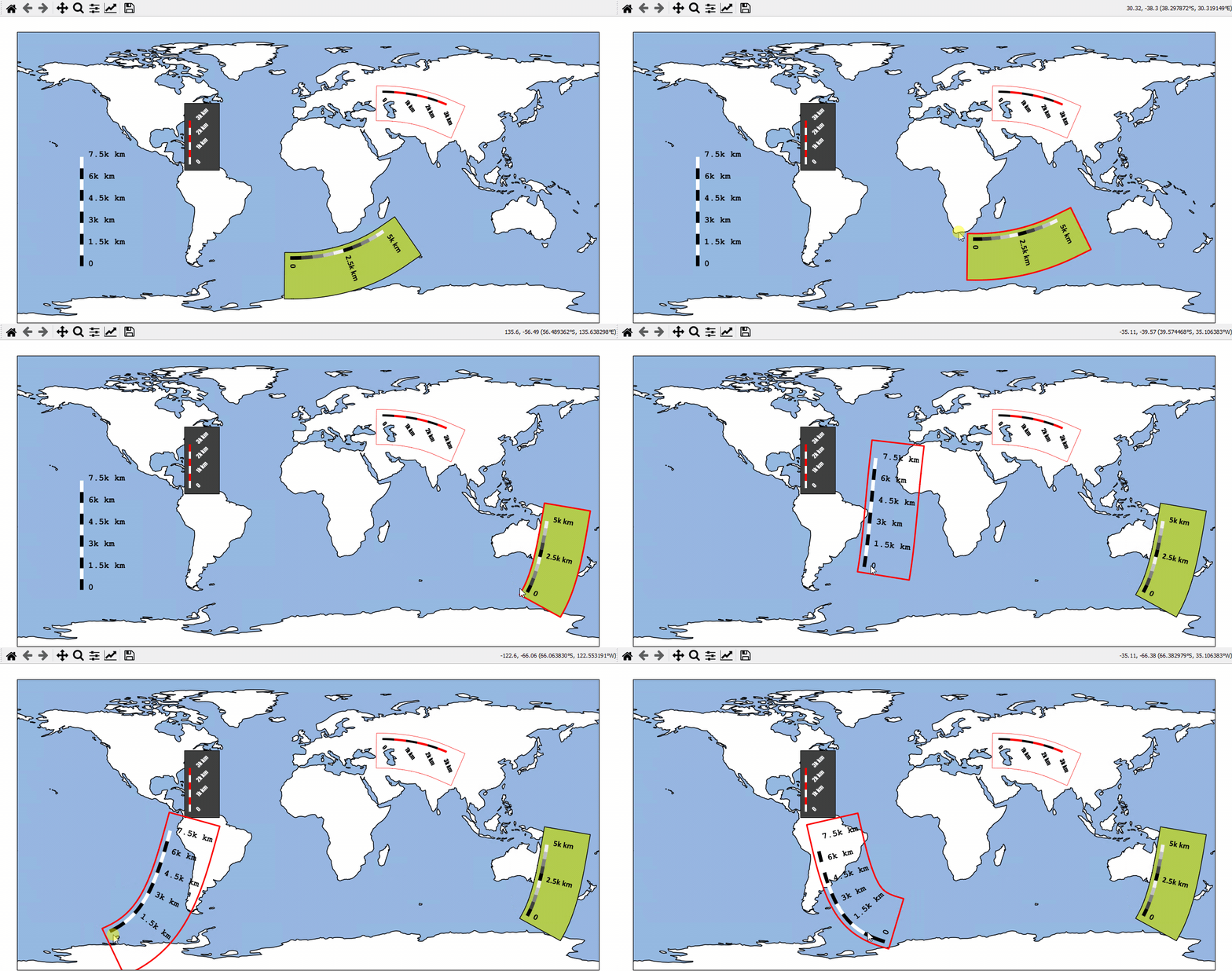
- The data displayed in the above gif is taken from:
NaturalEarth (https://www.naturalearthdata.com/)
# EOmaps example: Adding scalebars - what about distances?
from eomaps import Maps

m = Maps(figsize=(9, 5))
m.add_feature.preset.ocean(ec="k", scale="110m")

s1 = m.add_scalebar((0, 45), 30, scale=10e5, n=8, preset="kr")

s2 = m.add_scalebar(
    (-11, -50),
    -45,
    scale=5e5,
    n=10,
    scale_props=dict(width=5, colors=("k", ".25", ".5", ".75", ".95")),
    patch_props=dict(offsets=(1, 1.4, 1, 1), fc=(0.7, 0.8, 0.3, 1)),
    label_props=dict(
        offset=0.5, scale=1.4, every=5, weight="bold"  # , family="Calibri"
    ),
)

s3 = m.add_scalebar(
    (-120, -20),
    0,
    scale=5e5,
    n=10,
    scale_props=dict(width=3, colors=(*["w", "darkred"] * 2, *["w"] * 5, "darkred")),
    patch_props=dict(fc=(0.25, 0.25, 0.25, 0.8), ec="k", lw=0.5, offsets=(1, 1, 1, 2)),
    label_props=dict(
        every=(1, 4, 10), color="w", rotation=45, weight="bold"  # , family="Impact"
    ),
    line_props=dict(color="w"),
)

# it's also possible to update the properties of an existing scalebar
# via the setter-functions!
s4 = m.add_scalebar(n=10, preset="bw")
s4.set_scale_props(width=3, colors=[(1, 0.6, 0), (0, 0.5, 0.5)])
s4.set_label_props(every=2)

# NOTE that the last scalebar (s4) is automatically re-scaled and re-positioned
#      on zoom events (the default if you don't provide an explicit scale & position)!

m.add_logo()
m.show()