
Vector-data interactive geometries#
EOmaps can be used to assign callbacks to vector data (e.g. geopandas.GeoDataFrames).
to make a GeoDataFrame pickable, first use
m.add_gdf(picker_name="MyPicker")now you can assign callbacks via
m.cb.pick__MyPicker.attach...just as you would do with the ordinarym.cb.clickorm.cb.pickcallbacks
Note
For large datasets that are visualized as simple rectangles, ellipses etc.
it is recommended to use EOmaps to visualize the data with m.plot_map()
since the generation of the plot and the identification of the picked pixels
will be much faster!
If the GeoDataFrame contains multiple different geometry types (e.g. Lines, Patches, etc.) a unique pick-collection will be assigned for each of the geometry types!
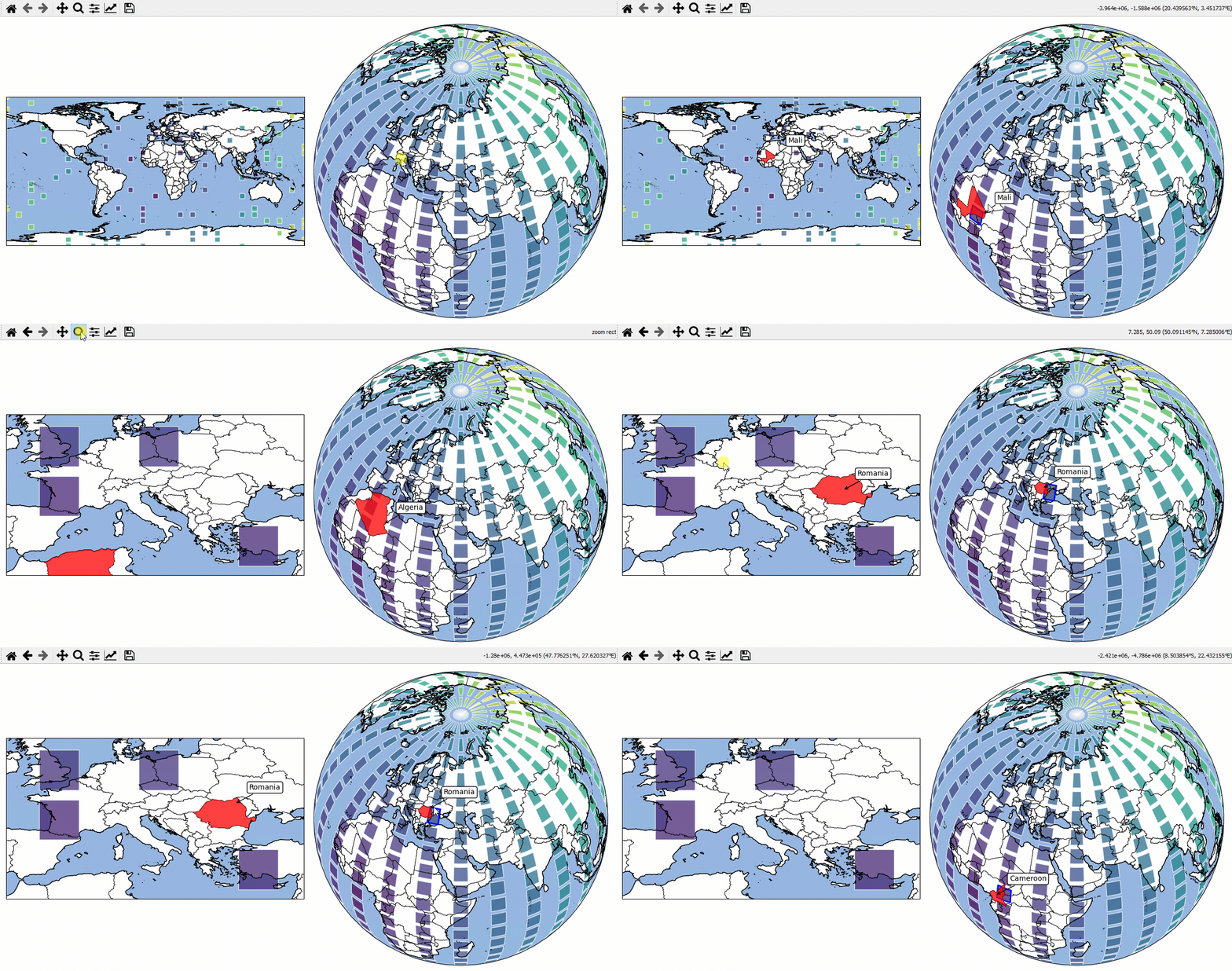
# EOmaps example: Using geopandas - interactive shapes!

from eomaps import Maps
import pandas as pd
import numpy as np

# geopandas is used internally... the import is just here to show that!
import geopandas as gpd

# ----------- create some example-data
lon, lat = np.meshgrid(np.linspace(-180, 180, 25), np.linspace(-90, 90, 25))
data = pd.DataFrame(
    dict(lon=lon.flat, lat=lat.flat, data=np.sqrt(lon**2 + lat**2).flat)
)

# setup 2 maps with different projections next to each other
m = Maps(ax=121, crs=4326, figsize=(10, 5))
m2 = Maps(f=m.f, ax=122, crs=Maps.CRS.Orthographic(45, 45))

# assign data to the Maps objects
m.set_data(data=data.sample(100), x="lon", y="lat", crs=4326, parameter="data")
m2.set_data(data=data, x="lon", y="lat", crs=4326)

# fetch data (incl. metadata) for the "admin_0_countries" NaturalEarth feature
countries = m.add_feature.cultural.admin_0_countries.get_gdf(scale=50)

for m_i in [m, m2]:
    m_i.add_feature.preset.ocean()

    m_i.add_gdf(
        countries,
        picker_name="countries",
        pick_method="contains",
        val_key="NAME",
        fc="none",
        ec="k",
        lw=0.5,
    )

    m_i.set_shape.rectangles(radius=3, radius_crs=4326)
    m_i.plot_map(alpha=0.75, ec=(1, 1, 1, 0.5))

    # attach a callback to highlite the rectangles
    m_i.cb.pick.attach.mark(shape="rectangles", fc="none", ec="b", lw=2)

    # attach a callback to highlite the countries and indicate the names
    picker = m_i.cb.pick["countries"]
    picker.attach.highlight_geometry(fc="r", ec="k", lw=0.5, alpha=0.5)
    picker.attach.annotate(text=lambda val, **kwargs: str(val))

# share pick events between the maps-objects
m.cb.pick.share_events(m2)
m.cb.pick["countries"].share_events(m2)

m.add_logo()
m.apply_layout(
    {
        "figsize": [10.0, 5.0],
        "0_map": [0.005, 0.25114, 0.5, 0.5],
        "1_map": [0.5125, 0.0375, 0.475, 0.95],
        "2_logo": [0.875, 0.01, 0.12, 0.09901],
    }
)
m.show()